

Close Menu
    What's New

    Spicy Chat AI Alternatives: How Top Uncensored Apps Stack Up

    September 26, 2026

    What to Check Before Installing a Water Softener: Tests, Sizing Math, and Where It Should Go

    September 26, 2026

    Living Alongside Iguanas, Raccoons, and Gators in South Florida

    September 25, 2026

    Why Your Home Deserves a Window Upgrade This Year

    September 25, 2026

    Injured and Overwhelmed? Here’s How a Personal Injury Lawyer Can Turn Things Around

    September 25, 2026
    Facebook X (Twitter) Instagram Threads
    Facebook X (Twitter) Instagram
    The Intelligence MagazineThe Intelligence Magazine
    Subscribe
    • Home
    • Celebrtity
    • Business
    • Lifestyle
    • Crypto
    • Fashion
    • Tech
    • News
    • Contact Us
    The Intelligence MagazineThe Intelligence Magazine
    Home»Entertainment»What Is Playhop.com? Features, Safety, Games, and How It Works
    Entertainment

    What Is Playhop.com? Features, Safety, Games, and How It Works

    Editorial TeamBy Editorial TeamAugust 5, 2026Updated:August 5, 2026No Comments13 Mins Read
    Playhop.com
    Share
    Facebook Twitter LinkedIn Pinterest Email Copy Link

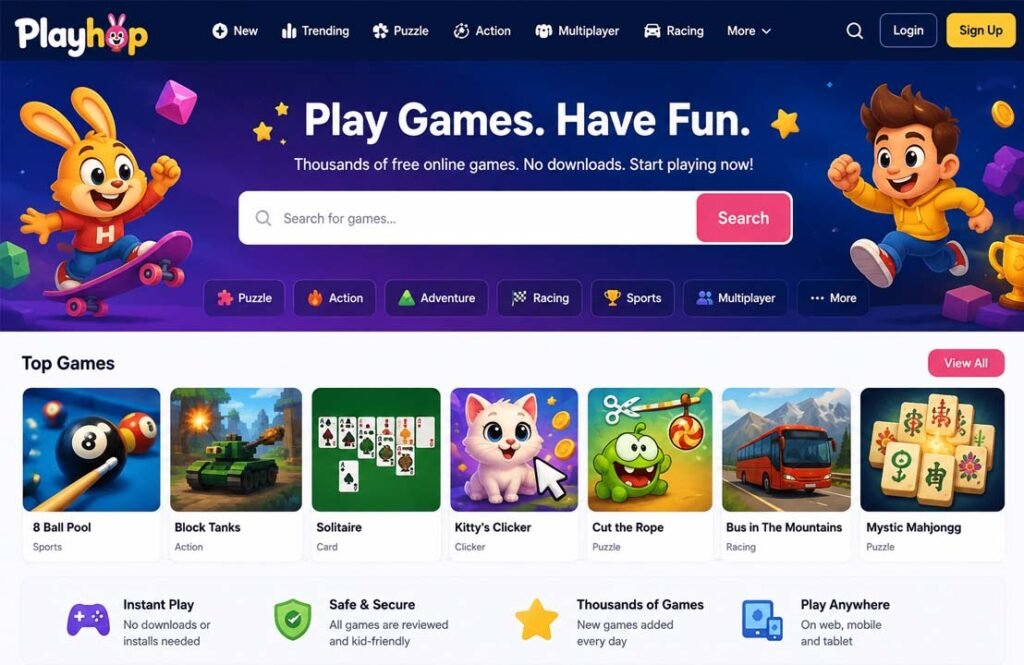
    Playhop.com is an online platform where you can play browser games without downloading or installing anything. It offers thousands of games across many genres, making it a popular choice for people who want quick and easy entertainment on a computer, tablet, or phone.

    Many people search for Playhop.com to learn what it is, how it works, whether it is safe, and if it is free to use. In this guide, you’ll find clear answers to those questions, along with information about its features, supported devices, games, pricing, and more.

    What Is Playhop.com?

    Playhop.com is a browser-based gaming platform that lets users play thousands of online games instantly. Instead of downloading games to a device, players open the website, choose a game, and start playing directly in their web browser.

    The platform focuses on HTML5 games, which run on modern browsers without requiring extra software. This makes Playhop.com easy to use on different devices, including desktop computers, laptops, tablets, and smartphones.

    Playhop is operated by Direct Cursus Technology L.L.C., a company based in Dubai, United Arab Emirates. It also serves as a publishing platform where game developers can make their browser games available to a wider audience.

    Unlike traditional gaming services that require large downloads or regular updates, Playhop hosts games online. Players always access the latest version of a game without installing updates themselves.

    The platform includes games for many age groups. While children can find simple educational and puzzle games, teenagers and adults have access to action, racing, strategy, simulation, and multiplayer titles. Because the library is updated regularly, new games are added over time.

    How Does Playhop.com Work?

    Using Playhop.com is simple. All you need is a device with an internet connection and a modern web browser.

    After opening the website, you can browse different game categories or use the search bar to find a specific title. Selecting a game opens it directly in your browser, allowing you to start playing within seconds.

    One of Playhop’s biggest advantages is that it does not require software installation for browser games. This saves storage space on your device and makes it easy to switch between games without waiting for downloads.

    Creating an account is optional. Visitors can play many games without signing in. However, users who register can unlock additional features such as saving game progress across devices, receiving personalized game recommendations, and managing their profile settings.

    Playhop also uses a recommendation system that suggests games based on your playing history. As you spend more time on the platform, it can recommend similar games that match your interests.

    Besides the website, Playhop offers an Android application. The app provides access to many of the same games and supports offline play for selected titles after they have been downloaded through the app.

    Main Features of Playhop.com

    Playhop includes several features designed to make browser gaming simple and convenient.

    Large Game Library

    One of Playhop’s biggest strengths is its large collection of browser games. Official information states that the platform hosts more than 20,000 games across over 30 different genres. The collection continues to grow as developers publish new titles.

    Because the games are browser-based, users can try different games without installing each one individually.

    Wide Variety of Game Genres

    Playhop offers games for many different interests. Categories include:

    • Action
    • Adventure
    • Puzzle
    • Racing
    • Strategy
    • Simulation
    • Arcade
    • Card games
    • Multiplayer
    • Educational games
    • Casual games
    • Sports
    • Kids’ games

    This variety makes it suitable for both short gaming sessions and longer play.

    Personalized Recommendations

    Registered users receive game suggestions based on what they have played before. This recommendation system helps players discover similar games without searching through the entire library.

    Recommendations become more useful as users spend more time playing on the platform.

    Multiplayer Support

    Some Playhop games support multiplayer gameplay. Depending on the game, players may compete against others online or invite friends to join using shared game links.

    Not every game includes multiplayer features, but the platform offers a growing selection of online multiplayer titles.

    Cross-Device Compatibility

    Playhop works on many different devices. Games can be played on:

    • Windows PCs
    • Mac computers
    • Chromebooks
    • Android phones
    • Android tablets
    • iPhones
    • iPads

    Since everything runs inside a browser, users can switch between compatible devices with little effort.

    Regular Game Updates

    New games are added regularly as developers publish fresh content. Existing games may also receive improvements without requiring players to install updates, since everything is hosted online.

    This helps keep the platform current while giving users new games to explore.

    Fast Access

    Because games launch directly in the browser, players can start within seconds. There is no need to wait for large downloads, installations, or software updates before playing.

    This quick access is one of the main reasons many people choose browser gaming platforms like Playhop.

    What Games Can You Play on Playhop.com?

    Playhop offers games across many genres, making it suitable for different ages and interests.

    Puzzle games are among the most popular choices. These games focus on problem-solving, matching, memory, and logic. Card games such as Solitaire and classic board-style games are also available for players who prefer slower, strategy-based gameplay.

    Players looking for faster action can choose from racing, action, adventure, and arcade games. These often include driving challenges, platform games, combat, and skill-based gameplay that can be enjoyed in short sessions.

    Simulation and sandbox games allow players to build, explore, or manage virtual worlds. Strategy games encourage planning and decision-making, while educational games are designed to help younger players develop thinking and learning skills.

    Playhop also features multiplayer games where users can compete with friends or other players online. The selection changes over time as new games are added and older titles are updated.

    Some examples of games that have appeared on Playhop include:

    • Cut the Rope
    • Granny Original
    • Melon Sandbox
    • Block Tanks
    • 8-Ball Pool
    • Domino Duel
    • Mystic Mahjongg
    • Solitaire

    Is Playhop.com Free?

    Yes, Playhop.com is free to use. Most games on the platform can be played without paying or creating an account. You simply visit the website, choose a game, and start playing in your browser.

    Creating an account is optional. A free account gives users access to extra features such as saving game progress across devices, receiving personalized game recommendations, and managing profile settings.

    Some individual games published by third-party developers may include optional in-game purchases or premium content. These purchases are related to the game itself rather than the Playhop platform.

    Free vs. Paid

    Free Features Possible Paid Features
    Play thousands of browser games Optional in-game purchases in some games
    No download required Premium content offered by certain games
    Browse all game categories Game-specific purchases, if available
    Search and discover new games Not required to use Playhop itself

    At the time of writing, Playhop does not require a paid subscription to access its main gaming platform.

    Is Playhop.com Safe and Legit?

    Playhop.com appears to be a legitimate browser gaming platform. It operates under published Terms of Use and Privacy Policy and is owned by Direct Cursus Technology L.L.C., based in the United Arab Emirates.

    Because games run directly in a web browser, users do not need to download executable files. This reduces the risk of downloading malware from unknown sources.

    According to Playhop, games are reviewed before being published on the platform. The company also states that it works to keep inappropriate or harmful content away from users.

    The platform includes many family-friendly games, making it suitable for children. However, parents should still supervise younger children, especially when games contain online features or advertisements.

    As with any online service, users should only visit the official Playhop.com website and avoid unofficial copies or lookalike websites.

    Privacy and Security

    Playhop has a Privacy Policy that explains how user information is handled. Like many online platforms, it may collect certain information needed to operate the service, improve recommendations, and manage user accounts.

    People who create an account can save their game progress, synchronize data across supported devices, and receive personalized game suggestions.

    Browser-based games also offer a security advantage because they do not require installing software on your device. However, users should still follow basic online safety practices.

    Some simple ways to protect your account include:

    • Use a strong password if you create an account.
    • Do not share your login details.
    • Keep your browser updated.
    • Visit only the official Playhop website.
    • Be careful when clicking advertisements or external links.

    Supported Devices and Platforms

    One of Playhop’s biggest advantages is that it works on many different devices.

    Supported platforms include:

    • Windows computers
    • Mac computers
    • Chromebooks
    • Android phones
    • Android tablets
    • iPhones
    • iPads

    Because Playhop uses HTML5 technology, games work in most modern web browsers without installing additional software.

    Playhop also provides an official Android app through Google Play. The app offers access to many of the same games available on the website. According to the app description, selected games can also be played offline after they have been downloaded through the app.

    There is currently no official information confirming a dedicated iPhone or iPad application. Apple users can continue using the browser version.

    Benefits and Drawbacks of Playhop.com

    Benefits

    Playhop offers several advantages for casual gamers.

    • Free access to thousands of games.
    • No downloads or installation required.
    • Works on computers, tablets, and smartphones.
    • Large collection of game genres.
    • Fast loading browser games.
    • Optional account for saving progress.
    • Regularly updated game library.
    • Easy to use for beginners.

    Drawbacks

    Like any gaming platform, Playhop also has some limitations.

    • Browser games require an internet connection.
    • Some games display advertisements.
    • Certain games may include optional purchases.
    • Multiplayer support depends on the individual game.
    • Offline play is limited to selected games in the Android app.
    • Available games may change over time.

    Common Problems and How to Fix Them

    Games Are Not Loading

    If a game does not open, refresh the page first. If the problem continues, clear your browser cache or try another browser.

    A slow or unstable internet connection can also prevent games from loading correctly.

    Slow Performance

    Close unnecessary browser tabs and other programs running in the background.

    Using an updated browser often improves performance. Older browsers may not fully support modern HTML5 games.

    Browser Compatibility Issues

    Playhop works best in current versions of popular browsers such as Chrome, Edge, Firefox, and Safari.

    If a game does not work in one browser, try opening it in another supported browser.

    Mobile Display Problems

    Some games are easier to play in landscape mode.

    If controls appear too small or the screen looks crowded, rotate your device and refresh the game.

    Saved Progress Is Missing

    If you were playing without signing in, your progress may not be saved across devices.

    Logging into the same Playhop account allows supported games to synchronize your progress.

    Best Tips for Using Playhop.com

    You can enjoy Playhop even more by following a few simple tips.

    • Create a free account if you want to save your progress.
    • Use the search feature to quickly find your favorite games.
    • Explore different categories to discover new games.
    • Try multiplayer games if you want to play with friends.
    • Keep your browser updated for the best performance.
    • Use the official Playhop.com website instead of unofficial copies.
    • Take regular breaks during long gaming sessions.

    Playhop.com Alternatives

    CrazyGames

    CrazyGames is one of the largest browser gaming platforms. It offers thousands of free HTML5 games across genres such as action, racing, shooting, puzzle, simulation, and multiplayer.

    Many people choose CrazyGames because it has a large collection of modern games that load quickly without downloads. Like Playhop, it works on desktop and mobile browsers. It is a good choice for players looking for frequent updates and competitive multiplayer games.

    Poki

    Poki is another popular browser gaming website that focuses on simple, easy-to-access games.

    It includes action, sports, puzzle, adventure, and educational games for different age groups. The website has a clean design that makes finding games easy, especially for younger users.

    People who want a simple gaming experience without creating an account often choose Poki.

    Y8

    Y8 has been available for many years and offers thousands of browser games.

    Its library includes arcade, puzzle, strategy, racing, multiplayer, and classic games. It also supports player profiles, achievements, and community features that are not found on every browser gaming platform.

    Y8 is suitable for users who enjoy both newer HTML5 games and older browser titles.

    GamePix

    GamePix is a browser gaming platform that works across computers, tablets, and smartphones.

    It focuses on HTML5 games that run without downloads and offers categories similar to Playhop, including action, puzzle, sports, simulation, and racing games.

    GamePix is also known for providing games that developers can publish on other websites.

    Kongregate

    Kongregate is one of the best-known names in browser gaming.

    Although its focus has changed over the years, it still offers many online games and has a long history in the browser gaming community. Players often choose Kongregate because of its achievements, player accounts, and large collection of games.

    SilverGames

    SilverGames offers a wide variety of free browser games, including driving, simulation, sports, shooting, strategy, and puzzle titles.

    The website is easy to navigate and regularly updates its game collection. It is a good alternative for players who want another large library of free online games.

    Bottom Line

    Playhop.com is a browser-based gaming platform that lets users play thousands of games without downloading or installing software. It supports many devices, offers games across numerous genres, and allows people to start playing within seconds.

    The platform is free to use, while optional accounts provide extra features such as saved progress and personalized recommendations. It also offers an official Android app for users who want additional convenience.

    Overall, Playhop.com is a practical choice for casual gamers, families, and anyone who wants quick access to browser games without using device storage.


    Frequently Asked Questions

    What is Playhop.com?

    Playhop.com is a browser-based gaming platform where users can play thousands of online games without downloading or installing software.

    Is Playhop.com free to use?

    Yes. Most games are free to play, and the platform does not require a subscription. Some individual games may offer optional in-game purchases.

    Is Playhop.com safe for kids?

    Playhop includes many family-friendly games and states that games are reviewed before publication. Parents should still supervise younger children while they are online.

    Do I need to create an account to play games?

    No. Many games can be played without an account. Creating a free account allows you to save progress and access additional features.

    Can I play Playhop.com games on my phone?

    Yes. Playhop works in mobile web browsers and also offers an official Android app.

    Does Playhop.com require downloads or installation?

    No. Browser games run directly on the website without requiring installation. Only the optional Android app needs to be downloaded.

    Why is a Playhop.com game not loading?

    Common solutions include refreshing the page, checking your internet connection, updating your browser, clearing the browser cache, or trying a different browser.

    What are the best alternatives to Playhop.com?

    Some of the most popular alternatives include CrazyGames, Poki, Y8, GamePix, Kongregate, and SilverGames. Each offers free browser-based games across a wide range of genres


    Read Next: uBlock Origin Lite: What It Is, Features, How It Works, and Is It Safe?

    Share. Facebook Twitter Pinterest LinkedIn Tumblr Email Copy Link
    Editorial Team
    • Website

    Related Posts

    What Is MethStreams? Features, Safety, Legal Status & Best Alternatives (2026)

    August 5, 2026

    MethStreams.ms: What It Is, How It Works, Safety, Legal Status & Best Alternatives

    August 5, 2026

    What Is Putlocker.pe? Complete Guide to Features, Safety, and Legal Status

    August 5, 2026
    Latest Posts

    Spicy Chat AI Alternatives: How Top Uncensored Apps Stack Up

    September 26, 2026

    What to Check Before Installing a Water Softener: Tests, Sizing Math, and Where It Should Go

    September 26, 2026

    Living Alongside Iguanas, Raccoons, and Gators in South Florida

    September 25, 2026

    Why Your Home Deserves a Window Upgrade This Year

    September 25, 2026

    Injured and Overwhelmed? Here’s How a Personal Injury Lawyer Can Turn Things Around

    September 25, 2026
    Popular Posts

    Franchise Ownership Made Simple: Your Path to Business Freedom

    By Prime Star

    Who Is Jamie White-Welling? The Story About the Tom Welling’s Ex-Wife

    By Zaid

    Who Is Julie Lauren Curtis? The Story of Trace Adkins’ Second Wife

    By Zaid
    Categories
    • Artificial Intelligence (7)
    • Blog (51)
    • Business (53)
    • Celebrtity (232)
    • Entertainment (13)
    • Fashion (5)
    • Health (11)
    • Lifestyle (81)
    • News (143)
    • Sports (1)
    • Tech (44)
    • Travel (2)
    The Intelligence Magazine
    Facebook X (Twitter) Instagram Pinterest
    • Home
    • About Us
    • Privacy Policy
    • Sitemap
    • Contact Us
    © 2026 The Intelligence Magazine All Rights Reserved

    Type above and press Enter to search. Press Esc to cancel.