



A green test suite tells you your code does what you expected. It doesn’t tell you whether your app stays fast when 10,000 people use it at once, on a patchy network, on a three-year-old phone.
That gap is where many production incidents come from. Every unit test passes, the build ships, and then response times climb, pages stall, and users leave. The code was correct. It just wasn’t ready for the real world.
A complete testing approach closes that gap by layering different kinds of tests, each catching a different class of problem. This guide walks from the bottom layer, JUnit testing, through integration and end-to-end tests, up to performance testing under real-world conditions, and shows how to connect them in one pipeline.
The testing pyramid at a glance
The classic testing pyramid puts many fast, cheap tests at the bottom and fewer slow, realistic tests at the top. Most of your checks should be JUnit tests at the base. Performance testing sits at the top because it’s closest to what real users feel.
Layer 1: JUnit testing as the foundation
Unit tests check the smallest pieces of your code, one method or class at a time, in isolation. For Java and Kotlin teams, including Android developers, JUnit testing is the standard way to do this. JUnit 5 (Jupiter) is the current generation, with cleaner annotations, parameterized tests and better extension support.
A simple JUnit 5 test looks like this:
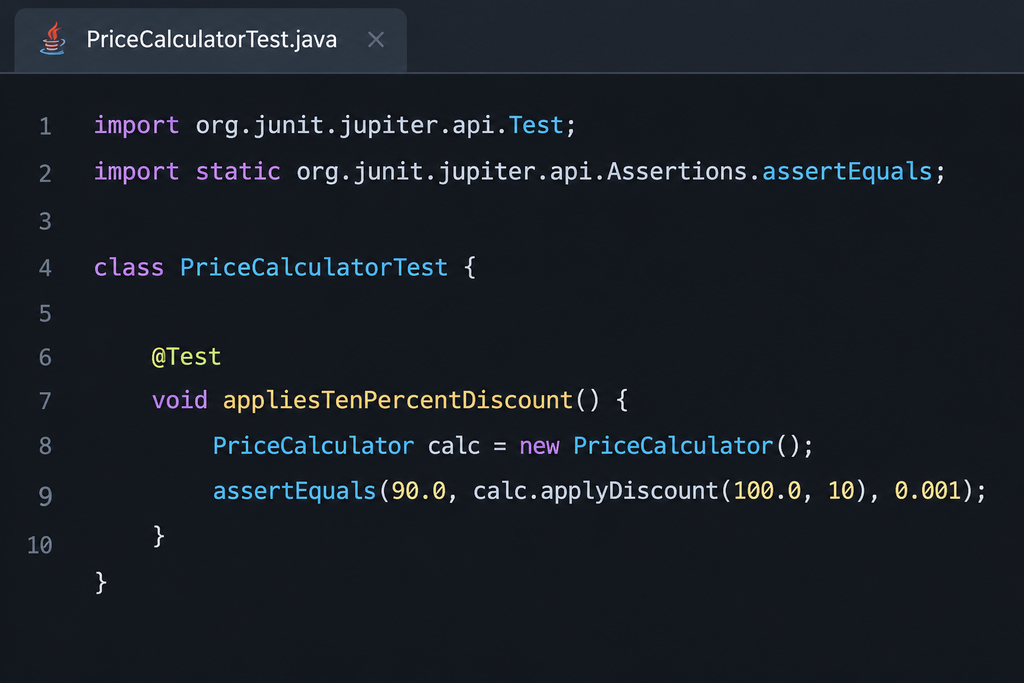
These tests run in milliseconds, which is exactly why they form the base of your strategy. You can run thousands on every commit and get feedback before a developer has switched tabs.
JUnit testing best practices
- Test one behavior per test. A clear name like appliesTenPercentDiscount tells you what broke without reading the code.
- Follow Arrange, Act, Assert. Set up the inputs, call the method, check the result. It keeps tests readable.
- Isolate dependencies. Use Mockito or MockK to replace databases, network calls and other services with mocks, so tests stay fast and deterministic.
- Cover edge cases with parameterized tests. @ParameterizedTest runs the same test against many inputs, including nulls, zeros, negatives and boundaries.
- Keep tests independent. No test should rely on another test’s state or run order.
- Track coverage, but don’t chase 100%. Tools like JaCoCo show untested code. Focus on business logic, not getters and setters.
What JUnit testing can’t tell you
Unit tests prove that each piece works on its own. They can’t show whether the pieces work together, whether a database query slows down at scale, or whether the app stays responsive under load. That’s what the upper layers are for.
Layer 2: Integration and API tests
Integration tests check that your components work together: the service talks to the database correctly, the API returns the right response, and the message queue delivers what it should.
The good news is you don’t need a new framework. Many integration tests are still written with JUnit, extended with tools such as:
- Testcontainers, which spins up real databases, Kafka or Redis in Docker for the length of a test
- Spring Boot Test, which loads the application context and wires real components together
- REST Assured, for readable API tests that check status codes, headers and response bodies
- WireMock, to stub third-party APIs you don’t control
These tests are slower than unit tests, so keep them focused on the boundaries: database access, API contracts and calls between services. This layer catches mismatched data formats, broken queries and configuration errors that unit tests with mocks will never see.
Layer 3: End-to-end and UI tests
End-to-end (E2E) tests walk through complete user journeys, such as signing up, searching, adding to cart and checking out, the same way a real user would.
Common tools include Selenium and Playwright for web apps, and Appium, Espresso and XCUITest for mobile apps. These frameworks often sit on top of a JUnit or TestNG runner, so results flow into the same reports as your unit tests.
E2E tests are the slowest and most fragile layer, so be selective:
- Cover your most critical, revenue-carrying journeys, not every edge case
- Use stable locators (IDs or accessibility labels) rather than brittle XPath
- Run them on real browsers and real devices, since emulators miss OEM quirks and real rendering behavior
E2E tests confirm that the whole system works. They still don’t tell you whether it works well when thousands of users hit it at once. That’s the job of the final layer.
Layer 4: Performance testing under real-world conditions
Performance testing answers the question every other layer skips: how does the system behave under real load and real conditions? It measures speed, stability and scalability, not just correctness.
Types of performance testing
| Type | What it checks | Example question |
| Load testing | Behavior at expected traffic | Can we handle a normal Monday peak? |
| Stress testing | The breaking point beyond expected traffic | At what load do errors start, and how do we recover? |
| Spike testing | Sudden bursts of traffic | What happens when a sale email goes out? |
| Soak (endurance) testing | Stability over hours or days | Do memory leaks or slowdowns appear over time? |
| Scalability testing | How capacity grows with resources | Does doubling servers double throughput? |
Metrics that matter
- Response time, tracked at the 95th and 99th percentile, not just the average. Averages hide the slow requests your unhappiest users see.
- Throughput: requests or transactions per second
- Error rate under load
- Resource use: CPU, memory, database connections and thread pools
- Client-side experience: page load, time to interactive, app launch time, frame rate and battery drain on real devices
Tools for performance testing
For backend load, popular choices include Apache JMeter, Gatling, k6 and Locust. For finding slow code early, JMH (the Java Microbenchmark Harness) benchmarks individual methods, which pairs naturally with JUnit testing at the code level.
Server-side load tests only show half the picture, though. Users experience performance through a real device on a real network, in a real location. Testing on real devices across networks and geographies, with a platform such as HeadSpin, shows what users actually feel: slow screen loads, stalled video or a laggy UI that server metrics can miss.
Performance testing best practices
- Set budgets first. Define clear targets, such as “p95 API response under 300 ms” or “app launch under 2 seconds,” so results have a pass or fail.
- Use realistic scenarios. Model real user behavior, data volumes and network conditions, not one endpoint hammered in a loop.
- Test in an environment close to production. Results from an undersized test environment can mislead.
- Run tests regularly, not just before launch. Performance regressions creep in one commit at a time.
Connecting it all in CI/CD
The layers pay off when they run automatically, each at the right moment in your pipeline:
| Pipeline stage | Tests that run | Goal |
| Every commit | JUnit unit tests, static analysis | Feedback in minutes |
| Every pull request | Integration and API tests, a quick performance smoke test | Catch broken contracts and obvious slowdowns before merge |
| Nightly or pre-release | Full E2E suite on real browsers and devices, load and soak tests | Confirm critical journeys and performance budgets |
| Production | Real-user and synthetic monitoring | Spot regressions users actually feel |
A few habits keep the pipeline healthy:
- Fail fast. Run the cheapest tests first so most problems are caught in minutes.
- Gate on performance budgets. Treat a p95 regression like a failed JUnit test: the build doesn’t ship.
- Fix flaky tests quickly. A test that fails randomly teaches the team to ignore failures.
- Feed production back into tests. Every incident should become a new unit, integration or performance test.
Conclusion
No single kind of test can carry quality on its own. JUnit testing gives you a fast, reliable foundation that proves your logic is correct. Integration and E2E tests prove the pieces work together. Performance testing proves the whole system holds up under real users, real devices and real networks.
The teams that ship with confidence don’t pick one layer over another. They connect all of them in one pipeline, so a bug or a slowdown is caught at the cheapest possible point, long before a user ever notices.
